



















Upscale low-res images with AI
Upload a photo or detailed image and choose how wide it will print. An AI upscaling model enlarges it to the pixels that width needs at 300 DPI, up to 24 inches wide, and you get one PNG for $1.00. You see a free preview first, and nothing is traced: a photo stays a photo.
- One PNG sized for a 300 DPI print
- Prints up to 24 in wide
- Free preview first
- $1.00 per image, paid once
How many pixels a print needs
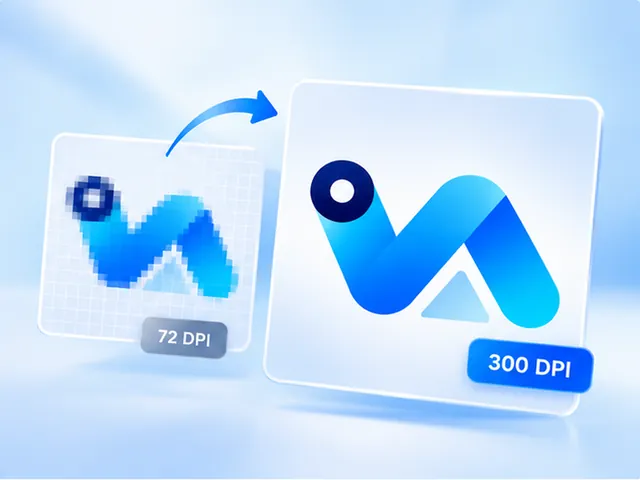
Print shops work at 300 dots per inch. Multiply the print width in inches by 300 and you have the pixels a sharp print needs: 1,200 across for 4 inches, 3,600 for 12 and 7,200 for 24. An image with fewer pixels gets stretched to fit, and stretching is what makes prints soft.
Upscaling adds the missing pixels. The page reads your image's size and offers only the print widths it can actually reach, before you pay anything.
Not printing to a set width? Choose 2× or 4× instead and the PNG comes back with twice or four times the pixels each way, still marked 300 DPI. The page shows the exact size before you pay.
Upscale or vectorize?
Upscale photographs, soft gradients, painted or textured artwork: anything where the detail is the point. Vectorize logos, lettering and flat-colour designs instead. A vector prints sharp at any size at all, while tracing a photo would turn it into flat shapes.
Not sure which you have? Upload it. The page tells you when an image looks like a photo or a flat logo and suggests the product that suits it.
An enlargement, not a reinvention
The upscaling model was chosen by measuring how faithfully each candidate enlarged the same test image: how little it invented, not how much sharper it looked. In a print of your own photo or artwork, detail that was never there is a defect.
What it can't take
The upscaler accepts images up to 4 megapixels and 10 MB. A photo bigger than that often prints large enough as it is: a 12-megapixel phone photo is already about 13 inches wide at 300 DPI. A very small image may fall short of the smallest print size. Either way, the page says so before anything is sent, so no free preview is spent finding out.
Questions, answered
- What does 300 DPI mean?
- Dots per inch: how many pixels are printed in each inch of paper. 300 is the usual standard for sharp prints seen up close, so a print 10 inches wide at 300 DPI needs an image 3,000 pixels wide.
- What exactly do I get?
- One PNG, enlarged and sized for the print width you choose, for $1.00. It isn't traced, so there's no SVG, PDF or EPS. For those, convert it to a vector instead.
- How large can I print?
- Up to 24 inches wide at 300 DPI, depending on your image. A smaller image reaches less, and the page shows the widths yours can reach before you pay.
- Will upscaling fix a blurry photo?
- It enlarges what's in the photo without the blocky look of stretching. It won't recover detail that isn't there, such as a face too small to make out or text that's already unreadable, so look closely at the free preview before paying.
- Which files can I upload?
- PNG, JPG and WebP. The upscaler takes images up to 4 megapixels and 10 MB, and the page checks yours before anything is sent.
- Can I see it before I pay?
- Yes. The preview is free and shows the upscaled result. If you buy, the download link for your PNG works for 12 months, and the file is yours to keep.