












Turn any image into a clean vector
Upload a PNG, JPG or WebP and an AI vectorizer redraws it as smooth paths and flat colours, the kind of file that prints sharp at any size and opens as shapes in design software. You get a free preview first. If it's right, $3.99 buys the SVG, PDF, EPS and a 300 DPI PNG.
- SVG, vector PDF, EPS and a 300 DPI PNG
- Free preview, no account needed
- $3.99 per design, paid once
- Commercial use, no royalty
What vectorizing a file actually does
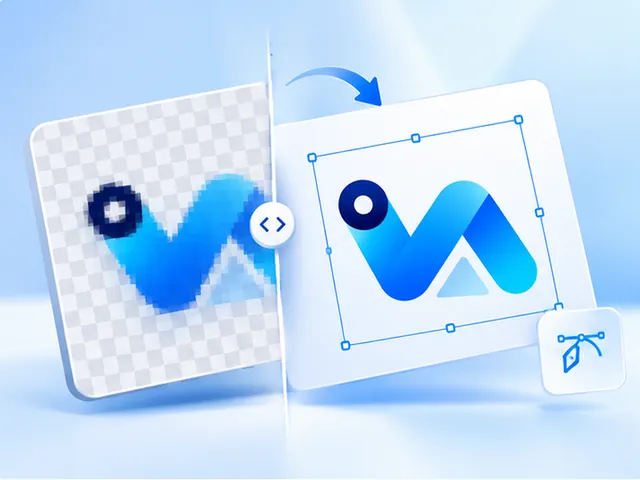
A raster file such as a PNG, JPG or WebP is a fixed grid of pixels. Vectorizing it means finding the shapes that grid is trying to show, every letter, outline and patch of colour, and describing each one as a path with an edge and a fill.
The result has no resolution of its own. A printer, a vinyl cutter or a laser engraver can draw it at whatever size the job needs, and a designer can open it and move, recolour or delete each shape on its own.
AI tracing, not a pixel-by-pixel auto-trace
The auto-trace built into many design programs follows pixel edges literally, so it copies every jagged step and compression speck it meets. The vectorizer used here is trained to recognise the shapes an image means to show: it fits smooth curves and sharp corners where they belong and leaves the noise behind.
If that engine is ever unavailable, a conventional tracer runs instead. Either way, the preview you approve is the file you are sold, so nothing changes between what you check and what you download.
Which images vectorize well
Logos, lettering, icons, badges, line art and flat illustrations come out best, because they are already made of shapes. Small, compressed or slightly soft copies of them are fine: that is what the trace is for.
Photographs and artwork with soft shading are another matter. A vector is built from flat colours, so a gradient comes back as visible steps, which the free preview shows before you pay.
For a photo you want printed larger, an upscaled PNG is usually the better buy.
One file in, four files out
Questions, answered
- Is this AI vectorizing?
- Yes. The tracing engine uses machine learning to find the shapes, edges and colours in your image instead of following pixels one by one. If it's ever down, a classic tracer takes over, and the free preview always shows the result you'd be paying for.
- What kinds of files can I vectorize?
- PNG, JPG and WebP images up to 25 MB. If your design is in another format, such as a HEIC photo or a page in a PDF, save or export it as a PNG first and upload that.
- How many colours can the vector have?
- As many as the design needs, up to 24, and you can set the number yourself before you buy. Fewer colours make a simpler file, which screen printers and vinyl cutters often prefer.
- Can I vectorize a file for free?
- Previews are free, up to 2 an hour, and you can study each one for as long as you like. Downloading the finished files costs $3.99 per design, paid once, with no subscription.
- Will the vector look exactly like my image?
- For flat artwork, very close: the same shapes and colours with cleaner edges. Fine texture, soft shadows and gradients are simplified into flat areas, because that is what a vector is made of. Zoom into the preview to check the details that matter to you.
- What is the difference between vectorizing and upscaling?
- Vectorizing redraws an image as shapes, which suits logos and flat art and prints at any size. Upscaling enlarges the pixels of a photo to one print width. The upload page suggests whichever fits the image you give it.